Does Your Google Business Profile Need Your Home Address?
Yes, you can keep your home address off Google, and Google says you should if clients do not come to you. What nobody tells you is what that costs, and that Google is only one of the places your address can turn up.
By Eva Petrakova · Local Business Systems
What most home-based owners do is put the home address in, panic, and delete it. Or they leave it there and take it as a business risk. When I set up a profile for a client, I hide the address whenever it is a personal one, especially when the owner lives alone.
Do you have to show your home address on your Google Business Profile?
No. If clients do not visit you, Google's own guidance is to remove the address and set a service area instead. Its example is a plumber who runs the business from home: clear the address from the profile.
What people then see is your business name and the areas you serve.
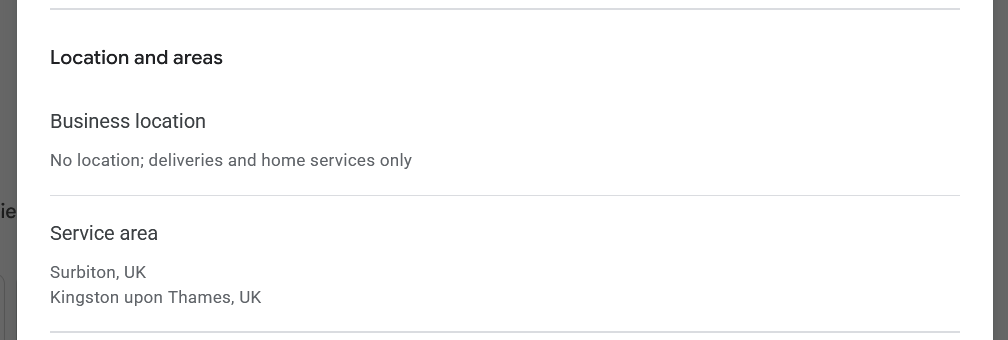
Does hiding your address hurt your ranking?
Probably, yes. Google ranks local results on three things: how relevant you are to the search, how far you are from the person searching, and how well known you are. Testing by local search specialists suggests that hiding the address does not remove the distance part. Google still measures from the address it holds. It just stops showing it.
So the service area is a label. It does not extend your reach, and adding Richmond to your list will not make you appear in Richmond. One local search agency tested exactly this and put it bluntly: the ranking comes from the address the business verified with, and "the only impact that the service area has is visual". The same agency hid the address on a client's listing: its rankings and calls dropped for the month the address was hidden and came back when it was restored, and a second listing did the same. That is one agency's tests, so treat them as a warning rather than a law. Their own conclusion was that Google needs to fix this if it wants people to follow its rules.
I agree with them, and I come back to why at the end.
Can you use a virtual office or your accountant's address instead?
Not on Google. A postal address you rent but do not work from is, in Google's words, not eligible for a Business Profile. PO boxes are not acceptable either, and Google reserves the right to suspend profiles that break its guidelines. You would be trading a hidden address for the risk of no profile at all.
The same goes for a limited company whose registered office is the accountant's address. It is not where you work, so it does not go on your profile. It belongs on your website's legal pages.
The honest alternative is a real place where you actually see clients: a studio, a clinic room, a shared practice. Google accepts an address like that when it has permanent signage with your business name, and you actually receive clients there during the hours you list. If that is how you work, it can go on the profile. If it is not, do not pretend.
If you work entirely online, it is worth knowing that Google's guidelines describe profiles for businesses that customers can visit, or that travel to their customers. Online-only work is not on that list.
Where else is your address showing?
Google is the one people worry about, and often not the one exposing them.
When I take on a new client, I start by looking at what is already out there. With one client I searched for her business, and one of the top results was her address, from Companies House. She pays her accountant for a correspondence address, the service people buy so their own address stays off the public record. Her entry as a director showed the accountant's address. Her entry as a person with significant control still showed her own. Those are separate records, changed on separate forms, so it is easy to update one and not the other. There is also a route to protect personal details already on the register.
Directories are the other leak, and every one handles it differently. You only find out halfway through the form. When I listed my own business, two directories would not let me continue without a public street address, so I skipped them. One asked for my street but showed only the town. Another hides the street but, in its own help pages, says the town and postcode "can't be hidden".

Even Bing had a wobble: in September 2026 its support team told me that backend changes were temporarily stopping some service-area businesses from publishing, with a fix expected within weeks. So if a listing sits on "pending" for months, it may not be anything you did. Check that each one actually went live.
Your own website needs a thought too. UK rules for businesses online require a website to show "the geographic address at which the service provider is established". What counts if you work from home is a question for your accountant or solicitor, not for me.
How do you make up for a hidden address?
You cannot win back the distance, so you win on what you control. Google says plainly that how well known you are includes how many websites link to you and how many reviews you have.
That means reviews arriving steadily, not in one burst (the timing matters more than most people think). It means listings on directories that let you keep your address private, and links from local sites that know you: your Chamber, a studio you work from, a partner business. Some shared workspaces list their members by name, and that listing is worth having even when the address cannot go on your profile.
Be specific about where you are, in words. Name the town in your description and on your website, and start with the place you can win before spreading across London. You can expand later. Just keep the town out of your business name: Google's guidelines do not allow location or service words in the name.
Building that up is the ongoing half of the local search work I do for coaches in Kingston.
How can you check what is already out there?
Search your business name followed by the word address. Then do the same with your own name. Not your actual address, just the word. Then look at the results.
It is close to the search that turned up my client's.
Who pays for keeping an address private?
Personal safety comes above all, and hiding your address is the right call when you need to. But look at who carries the cost. A woman who has been through domestic abuse and cannot have her address online is doing exactly what she should, and the system disadvantages her further for it. That is a structural problem, and nothing she did caused it.
I would rather she knew the cost and made up the difference with reviews and listings. If you are still working out what your profile does for you in the first place, start with the basics.
Have you tried to sort this out for your own business and hit something I have not covered here? Email me and tell me what happened. Questions like yours shape what I write next.
© 2026 Local Business Systems. All rights reserved.